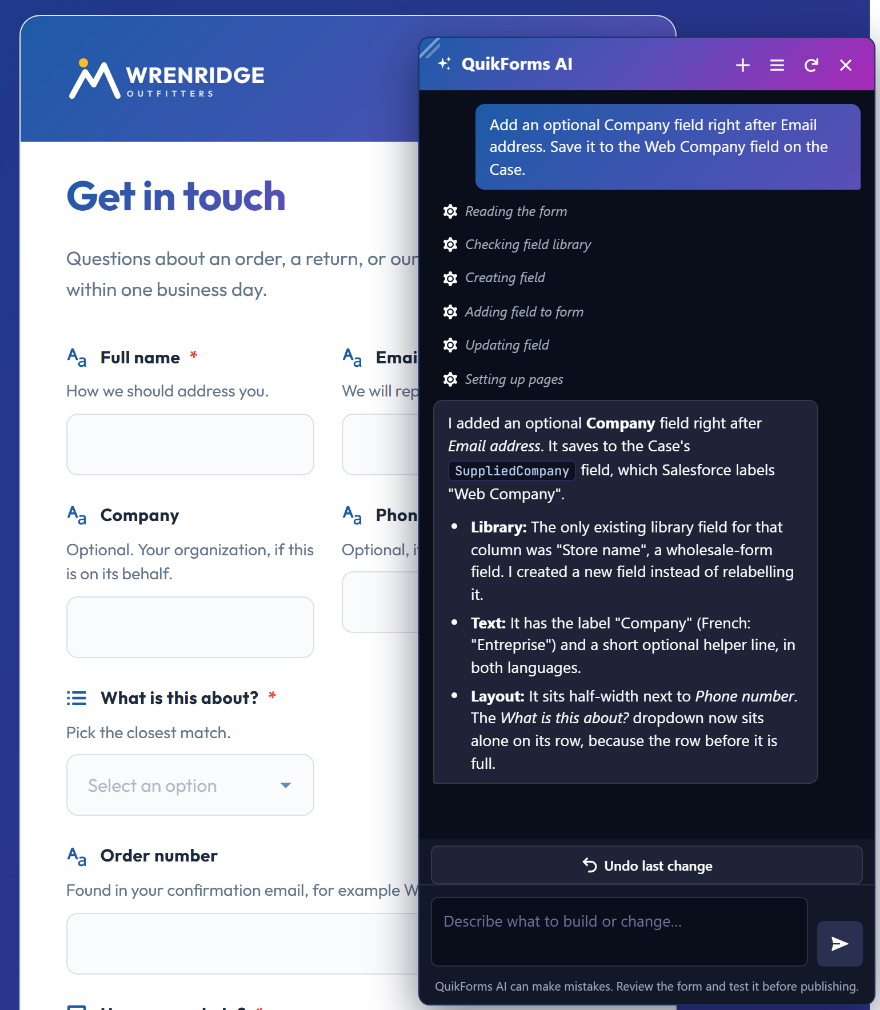
Describe your form.
Watch it build itself.Native to Salesforce
QuikForms is a complete form platform native to Salesforce, with a visual builder, native analytics, 100+ languages, bot protection, and file uploads. It also includes an AI that reads your live schema and writes the fields for you. Your form data never leaves your org.
From the visual builder to the analytics dashboard, QuikForms gives your team everything it needs to create, deploy, and measure forms at scale.
Visual Form Builder
Build forms visually with drag-and-drop field arrangement and real-time preview. Reuse fields from a shared library, clone any field in one click, and manage versions with a full draft-to-publish lifecycle.
Drag-and-drop field ordering
Live form preview
Version control with draft/publish/rollback
Take a form offline, or bring it back, in one click
Native Analytics Dashboard
Track form performance without third-party analytics. On Professional, a dashboard shows views, submissions, conversion rates, device breakdowns, browser stats, referrers, and daily trends, all stored natively in your Salesforce org. Standard counts total views and submissions for every form.
Conversion rate and completion time
Device and browser breakdown
Optional field-level detail shows where visitors quit
No cookies or third-party scripts
No data leaves your Salesforce org
Multi-Language Localization
Reach global audiences with full localization support. Translate labels, descriptions, tooltips, error messages, and dropdown options per language. End-users switch languages instantly with a built-in picker, or you link straight to a language by adding ?locale= to the form address (for example ?locale=fr_FR).
Complete Brand Control
Choose from 15 color properties, gradient backgrounds, 30 built-in fonts (or your own, uploaded to your org), and 8 pre-built themes. Upload your logo and favicon, adjust container widths, border radius, and every visual detail to match your brand.
Multi-Layer Security
Forms are protected by Cloudflare Turnstile CAPTCHA, honeypot fields, origin verification, input sanitization, and per-IP rate limiting. Every submission is validated again on the server, and everything runs inside Salesforce's native security model with TLS 1.2+ encryption.
File Uploads & Signatures
Accept file attachments up to 9 MB per file, or up to 2 GB on an Experience Cloud site. Images, PDFs, documents, and many other file types are supported. Capture digital signatures with the built-in signature field type.
Eight Field Types, Plus Your Own
The built-in types are text, textarea, select list, checkbox, date, date and time, signature, and custom HTML. A select list can render as a dropdown, radio buttons, checkbox groups, stars, or a toggle. Add field dependencies, value messages that react to a visitor's choice, tooltips, and validation that checks each field as it is filled in. On Professional, build new field types of your own with the plugin framework; they render on Experience Cloud and Salesforce Sites alike.
Multi-page Forms
Turn a long form into steps with a progress indicator, validation on every page, and a review page where visitors check their answers before they send. Answers survive a page reload, and the AI assistant can lay out the pages for you.
Deep Salesforce Integration
Map fields directly to any Salesforce object, standard or custom. On Professional, create multi-object forms with up to 3 levels of related records, trigger Flows, fire Platform Events, and integrate with external systems via Named Credentials.
Forms, Surveys & Chat
QuikForms offers three form types: record creation forms for data capture, survey forms with token-based access and expiration controls, and chat forms that start a conversation in Salesforce Messaging for In-App and Web.
Experience Cloud or Salesforce Sites
Publish forms on an Experience Cloud site, the recommended choice, where forms use none of your org's daily API allowance. Or use a Salesforce Site, where a completed form uses about three API calls. The Setup Assistant can create either kind of site for you.
Forms That Guide the Visitor
Show a value message, inline or in a pop-up, when a visitor picks particular options, and optionally disable the submit button until they change their choice. The server checks the same rules on every submission. An optional Reset Form button on the confirmation screen clears the form for the next person, which suits kiosks.
QuikForms AI
An AI That Knows Your Salesforce Org
Most AI form builders generate a static draft from a prompt. QuikForms runs a real
agent loop against your live schema, so every field it creates maps to an object
that actually exists in your org.
Build a form by describing it
Tell the assistant what you need in plain language and watch fields, layout,
validation, and styling appear in the live preview. Ask for changes and it
edits what is already there instead of starting over.
Reads your live object and field metadata
One-click Undo that survives a page refresh
Stop button honored between every step
Only ever edits a Draft, never a published form
Translate into 100+ languages
The AI translates every label, description, tooltip, and dropdown option in one pass.
Nothing is written until you approve it in a side-by-side review grid, next to
the original text. Translation is included on every plan,
with up to 5 languages per form on Standard.
Explain your analytics
Ask what your numbers mean. The AI separates people who never engaged from
people who started and gave up, and when a form records field-level detail it
tells you which field they abandoned. It says when the data cannot support a
conclusion. Insights are part of the Professional analytics dashboard.
Summarize your error logs
Turn a wall of exception rows into the two or three things actually going
wrong. Filter first, then summarize what you filtered, or explain any single
log in plain language.
Write validation patterns
Describe what a field should accept and get a working regular expression,
a plain-language explanation, and worked examples. Every pattern is
re-tested server-side before you can accept it.
Review before anything ships
When the AI edits a field other forms share, it clones instead of changing
it underneath them. You decide whether to merge the change back or keep it
separate.
Built for admins who have to answer for it
✓
Your form data never leaves your org.
The AI works on form configuration and aggregate counts. It never sees a
submission, and submissions are never sent anywhere.
✓
It cannot exceed your own permissions.
Every read and write runs as you, enforcing the same field-level security
and sharing rules that apply when you click through the UI.
✓
It only touches drafts.
The AI cannot edit a published form. Every change lands in a draft and
waits for you to review and publish it.
✓
Nothing runs without a click.
Opening a page never uses your AI allowance. Every AI action is triggered
deliberately, and a stale result is discarded rather than quietly redone.
✓
You can switch it off.
One org-wide setting disables every AI surface, and only users with
QuikForms admin access can use it. With AI off, every other feature works
normally.
✓
Use your own Anthropic account if you prefer.
The included allowance covers several hundred forms a
month and doubles for your first 45 days. If your security team requires a direct
relationship with the AI provider, connect your own Anthropic account instead and
we will not meter it.
Why Teams Choose QuikForms
QuikForms is purpose-built for Salesforce organizations that need professional forms without the overhead.
01
100% Native to Salesforce
Your form data never leaves your org. Forms, submissions, analytics, and configurations all live inside Salesforce, with no third-party database in the path. AI is admin-only, can be switched off org-wide, and never sees a submission.
02
Analytics Without the Tradeoffs
Built-in analytics track views and submissions on every plan, and on Professional add conversions, devices, and trends, all without Google Analytics or third-party analytics scripts. Because the data stays in your Salesforce org, it falls under the compliance posture you have already established there.
03
Set Up in Minutes, Not Weeks
The QuikForms Setup Assistant in your Salesforce utility bar does most of the setup for you. It gives you admin access, creates and publishes an Experience Cloud site or creates a Salesforce Site, gives the site's visitors exactly the access your forms need, prepares the objects your forms create records on, and connects free Cloudflare Turnstile bot protection. A checklist shows what is done and what is left, and org-wide settings live in the same place.
04
Enterprise Security Built In
Cloudflare Turnstile, honeypot fields, origin verification, and input sanitization work together, with per-IP rate limiting. The server re-checks required fields, validation patterns, and blocking rules on every submission, so a visitor cannot skip them by bypassing the browser.
05
Extensible When You Need It
Start with no-code and grow into custom development. On Professional, the plugin framework supports custom field types, validation logic, submission handlers, callout handlers, and a full JavaScript lifecycle API.
06
Multi-Object, Multi-Language
On Professional, create forms that write to multiple related objects in a single submission. On every plan, localize every element for global audiences. Build a form once and deploy it on Experience Cloud, on Salesforce Sites, or embedded via iframe.
Built for Real-World Use Cases
These examples show how organizations can use QuikForms across departments and industries.
Customer Contact & Case Creation
Deploy branded "Contact Us" forms that create Cases directly in Service Cloud. Capture file attachments, validate inputs with regex patterns, and block bots with Turnstile, all while logging analytics on form performance.
Case CreationFile UploadsBot Protection
Surveys & Customer Feedback
Send token-based survey links with configurable expiration periods. Track completion status, prevent duplicate submissions, and collect responses in custom Salesforce objects. Deploy in any language your customers speak.
Token AccessExpiration ControlMulti-Language
Multi-Object Data Collection
On Professional, create complex forms that write to multiple related Salesforce objects in a single submission. Map fields across up to 3 levels of parent-child relationships. Use field dependencies to show relevant questions dynamically.
Related ObjectsField DependenciesCustom Objects
Chat Pre-Qualification
Integrate forms with Salesforce Messaging for In-App and Web to pre-qualify visitors before connecting them with agents. Pass answers to the conversation as context fields, handle agent unavailability gracefully, and optionally create a record before the chat starts.
MessagingContext FieldsAgent Availability
How QuikForms Compares
Built for Salesforce teams, QuikForms is a 100% native alternative to legacy form builders.
AI That Can Actually See Your Schema
Bolt-on AI lives outside Salesforce, so it guesses at your objects and hands you a form you still have to map by hand. QuikForms AI runs inside your org and validates every field against a live describe call, so a field it creates is a field that works.
OthersGenerates a generic draft, then you map every field yourself
QuikFormsReads your live metadata, maps as it builds, and cannot invent a field
Your Data Never Leaves Salesforce
Most form builders route submissions through external servers before syncing to Salesforce. QuikForms writes directly to your org, with zero external databases and zero submission data in transit. The AI assistant works on form configuration only and never sees a submitted value.
OthersData stored on third-party servers, then synced
QuikForms100% native, so data goes straight into your Salesforce org
One Price, Unlimited Users
Most form builders charge per user, so the bill grows every time someone joins the team. QuikForms is a flat per-org fee that covers every admin and every user, with no seats to count or reassign.
OthersPer-seat pricing, so costs scale with team size
QuikFormsFlat per-org pricing with unlimited users included
Forms + Surveys + Chat in One Package
Forms, surveys, and document tools are often sold as separate products with separate bills. QuikForms bundles record creation forms, token-based surveys, and chat forms for Salesforce Messaging for In-App and Web into a single install.
OthersSeparate products for forms, surveys, and documents
QuikFormsForms, surveys, and chat, all included in every plan
Analytics Without Cookie Banners
Form analytics usually means Google Analytics or another third-party script, which brings a cookie consent banner with it. QuikForms analytics are built in, run natively in Salesforce, and use zero cookies or external scripts.
QuikFormsNative analytics that set no cookies of their own
Extensible Plugin Framework
QuikForms Professional includes a documented plugin framework. Developers build custom field types, validators, submission handlers, and callout handlers in Apex and JavaScript, against sixteen documented lifecycle hooks.
OthersUsually closed, so you get what ships and nothing more
QuikFormsOpen plugin framework with Apex + JavaScript APIs
Multi-Language Built In
Localization is usually an enterprise add-on or not available at all. Every QuikForms plan includes multi-language forms and the AI translation wizard, covering every label, tooltip, error message, and dropdown option. Standard covers up to 5 languages per form, which suits most businesses; Professional removes the limit.
OthersLocalization as a paid add-on or enterprise-only
QuikForms5 languages on Standard, unlimited on Professional, AI translation on both
Simple, Transparent Pricing
Every plan includes unlimited forms, unlimited submissions, and frontier AI.
Value messages (inline or pop-up, can block submit)
✓
✓
Multi-page forms with a review page
✓
✓
Survey forms and chat forms
✓
✓
File uploads (9 MB, or 2 GB on Experience Cloud)
✓
✓
Digital signature capture
✓
✓
Draft/publish workflow
✓
✓
Import/export forms
✓
✓
Multi-object forms (3-level parent/child)
Not included
✓
Version history & rollback
✓
✓
Styling & Localization
Full styling (15 color properties + 8 themes)
✓
✓
Multi-language localization (100+ languages)
Up to 5
Unlimited
QuikForms AI
AI form builder (describe it, watch it build)
✓
✓
AI validation pattern generation
✓
✓
AI error log explanation and digests
✓
✓
Monthly AI allowance included
Several hundred forms
1,000+ forms
Double allowance for your first 45 days
✓
✓
AI during the 14-day trial
Smaller allowance
Smaller allowance
Use your own Anthropic account (optional)
✓
✓
AI auto-localization
✓
✓
AI analytics insights
Not included
✓
Publishing & Setup
Experience Cloud sites (no API usage) and Salesforce Sites
✓
✓
Setup Assistant
✓
✓
Take a form offline and bring it back
✓
✓
Security & Analytics
Turnstile + honeypot bot protection
✓
✓
Total views and submissions per form
✓
✓
Salesforce object mapping
✓
✓
Built-in analytics dashboard
Not included
✓
Extensibility
Plugin framework
Not included
✓
Custom field types (Apex + JS)
Not included
✓
Custom field validators
Not included
✓
Submission handlers
Not included
✓
Callout handlers (Named Credentials)
Not included
✓
JavaScript lifecycle API
Not included
✓
Integrations
Flow integration hooks
Not included
✓
Platform Events for async processing
Not included
✓
Support
Email support
✓
✓
Priority support
Not included
✓
All plans include unlimited form submissions and come with a 14-day free trial that needs no credit card.
Frequently Asked Questions
Here is what you need to know about QuikForms.
No. The AI works on form configuration (field names, labels, layout, validation
rules) and on aggregate counts (how many people started a form, which field they
stopped at). Submitted values are never sent to the AI provider, and neither are the records
your forms create. Analytics never records what anyone typed, only whether a field was left
empty.
No. Every plan includes a monthly AI allowance, so there is no separate vendor to sign up
with, no second invoice, and nothing for your procurement team to approve. If your security
team requires a direct relationship with the AI provider, or you expect unusually heavy use,
you can connect your own Anthropic account instead and we will not meter it.
On a paid plan the allowance covers several hundred forms a month on Standard and over
a thousand on Professional, and your first 45 days come with double that so you can get
set up without watching a meter. We email you when you reach 80%. The free trial has a smaller allowance, sized for
evaluating the assistant rather than building a form set, and the assistant shows what
you have left as you go.
If you reach it, AI features pause until the allowance resets at the start of your
next billing period. Everything else keeps working exactly as normal: published forms
keep serving traffic, submissions keep landing in Salesforce, and analytics keeps
recording. Only the AI assistant is affected. Reaching the limit usually means something
unexpected is running, so get in touch and we will help you find it.
No. The AI can only edit a Draft, and it re-checks that on every single
change rather than once at the start. A published form serving live traffic is untouchable
until you publish a new version yourself. There is also a one-click Undo that restores the
draft and removes any fields the AI created, and it survives a page refresh.
Yes. One org-wide setting (AI Features Enabled, in the Setup Assistant's Settings) disables
every AI surface at once, and with it off no AI request is ever made, regardless of who is
using the product. AI buttons appear only for the people who administer QuikForms: those
with the QuikForms Admin permission set, directly or through the QuikForms Admins group.
QuikForms uses Anthropic's Claude models and routes each task to an appropriate one: a
frontier model for form building and analytics reasoning, a faster model for translation
and log explanation. If you connect your own account instead of using the included
allowance, it must be an Anthropic account.
For most orgs, setup takes a few minutes of clicks, plus the time Salesforce takes to create a site.
After you install the package, open the QuikForms app and choose QuikForms Setup Assistant
in the utility bar. Grant Me Access gives you the QuikForms Admins permission set group.
The Setup Checklist then shows what is done and what is left, and most steps have a
button that does the work: create and publish an Experience Cloud site or create a
Salesforce Site, grant the site's guest user access to what your forms need, add the
QuikForms fields to each object your forms create records on, and save your free
Cloudflare Turnstile keys. Platform Cache is allocated in Salesforce Setup; the assistant
checks it and lists the steps. QuikForms AI uses the allowance included in
every plan and turns on by itself once you have access.
No. QuikForms is designed for Salesforce administrators with no development background.
The visual builder, drag-and-drop fields, pre-built themes, and Setup Assistant make it possible to
create professional forms without writing any code. For teams that need advanced customization,
the Professional plan includes a plugin framework with Apex interfaces and a JavaScript API, but
it's entirely optional.
QuikForms tracks form performance natively inside Salesforce, with no external analytics
services, no cookies, and no third-party scripts. Every plan counts total views and
submissions for each form. Professional adds the analytics dashboard: conversion and
completion rates, average completion time, device and browser breakdowns, top referrers,
daily unique visitors (counted from a hashed IP address, per day), and daily trends, plus
optional field-level detail that shows which fields people skip, struggle with, or quit on.
Analytics can be switched off org-wide, and on Professional per form. Because all data stays in your Salesforce org,
it falls under the privacy and compliance controls you already apply there, with no external
tracking tool to assess.
Forms can create any standard Salesforce object (Cases, Leads, Contacts, etc.) or any custom object
in your org. The Standard plan supports single-object submissions, while the Professional plan unlocks
multi-object forms that can create up to 3 levels of related parent/child records in a single submission.
Professional also adds Flow integration for complex business logic, Platform Events for asynchronous
processing, and external system integration via Named Credentials.
QuikForms uses a defense-in-depth approach. Cloudflare Turnstile provides privacy-friendly CAPTCHA
verification without intrusive challenges. Honeypot fields catch automated bots silently, on
Experience Cloud and Salesforce Sites alike. Origin verification blocks cross-site submission
attempts. On Experience Cloud and Salesforce Sites alike, a per-IP rate limit (20 submissions a
minute by default, adjustable in the Setup Assistant's Settings) prevents abuse; it uses
Platform Cache, which the Setup Assistant helps you allocate. All inputs are validated and sanitized on both client and server
sides. Data is encrypted in transit via TLS 1.2+ and supports Salesforce Shield encryption at
rest. The plugin framework refuses to load Salesforce system classes as plugins, and loads only
classes built for the QuikForms plugin interface.
Yes. QuikForms provides 15 color properties covering backgrounds, text, buttons,
inputs, borders, titles, and more, with gradient support for backgrounds and titles. Choose from 30
built-in fonts or upload your own font to your org, upload your logo and favicon, and adjust container widths and border radius. Start with
one of 8 pre-built themes (Azure Horizon, Corporate Steel, Forest Executive, Navy Professional, and
others) and customize from there. Every visual detail is controllable without CSS.
Multi-language forms are included on every plan, along with the AI translation
wizard. Translations cover every text element: form titles, subtitles, field labels,
descriptions, tooltips, placeholder text, dropdown and radio options, error messages,
confirmation messages, and submit button labels. End-users switch languages via a
built-in picker, and anything untranslated falls back to your default language.
Standard covers up to 5 languages per form, which is enough for most businesses:
English plus Spanish, English plus French, or a European set of five. Professional
removes the limit for multinationals and organizations with statutory language
requirements.
QuikForms works on Experience Cloud sites, Salesforce Sites, or embedded via iframe in your own
website. Experience Cloud is the recommended choice: forms there are built from
Lightning Web Components and use none of your org's daily API allowance. On a Salesforce Site,
a Visualforce page renders the form with JavaScript, and each completed form uses about three
API calls. The Setup Assistant can create either kind of site for you. To check a draft before
publishing, open it with Preview, which gives you a time-limited preview link.
The 14-day free trial includes full access to all Professional plan features: unlimited forms,
all field types, multi-object forms, multi-language localization (100+ languages), complete styling
control, file uploads, bot protection, full analytics dashboard, version history & rollback,
the plugin framework, Flow integration, Platform Events, and priority support. No credit card is
required to start your trial, and you can upgrade, downgrade, or cancel at any time.
AI during the trial: the assistant is fully available, with a smaller
allowance than a paid plan. It comfortably covers building and refining a few forms, which
is enough to see how it works. The assistant shows what you have left as you go, so nothing
stops without warning, and your allowance jumps to the full plan amount the moment you
subscribe.
Start Building Better Salesforce Forms Today
QuikForms combines AI form building, native analytics, and multi-language support, and your submissions never leave your org. It is built for Salesforce teams who want their forms to stay native.